
 Download App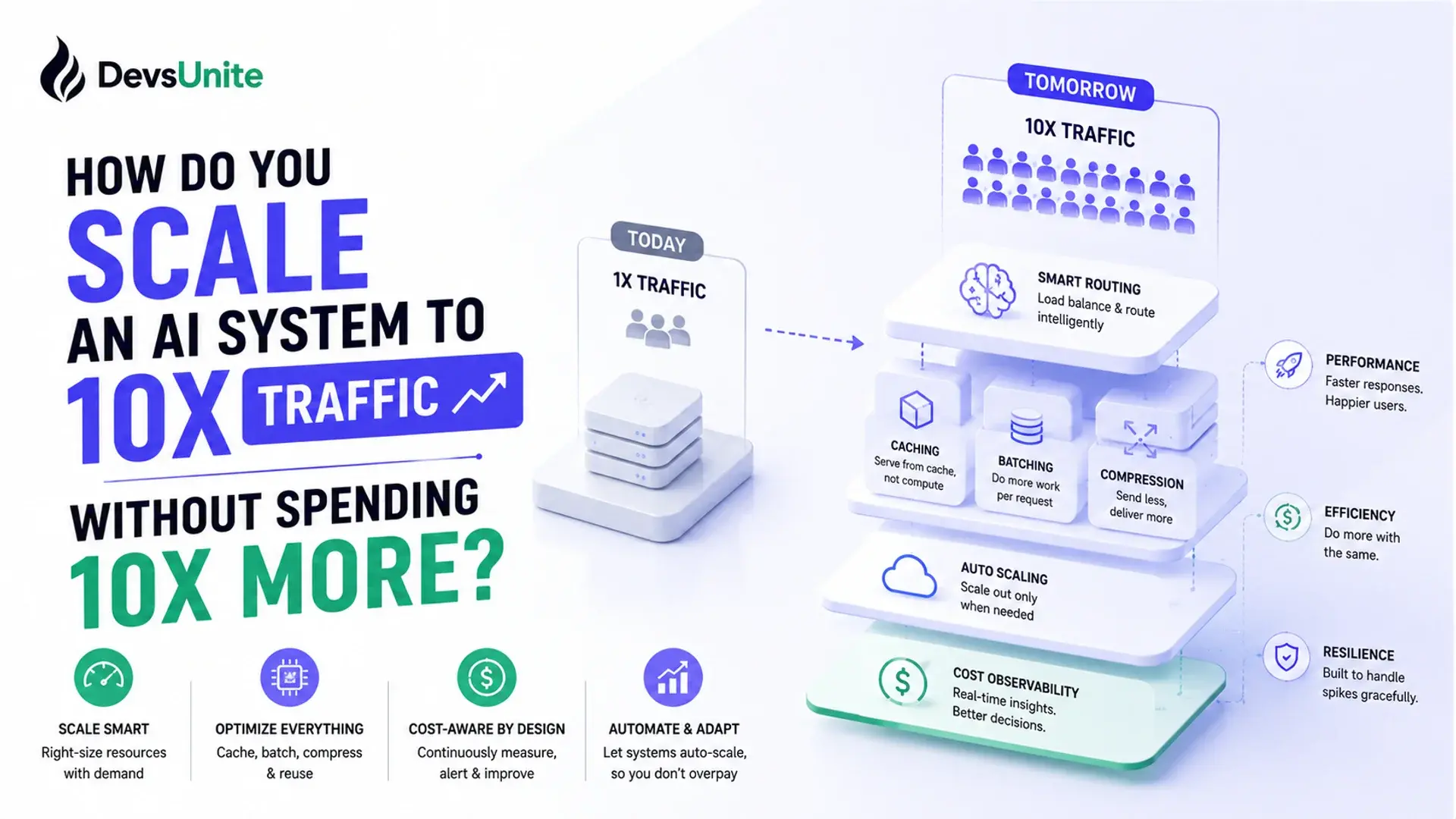
An AI system scaling strategy for 10x traffic works differently than scaling a typical web app: the bottleneck isn't requests-per-second, it's GPU-seconds-per-request, and cost scales with usage instead of flattening out. The fix is a phased plan: measure the real bottleneck, decouple cost from traffic, then add redundancy, not a blanket infrastructure upgrade.
Why AI Systems Don't Scale Like Ordinary Web Services
A typical web service scales horizontally: put more stateless handlers behind a load balancer, and throughput climbs close to linearly. The marginal cost of one more request is small enough to ignore.
AI inference doesn't work that way. Inference is the forward pass of a trained model producing an output, and it's compute-bound rather than I/O-bound. A single request can hold a GPU for tens to hundreds of milliseconds (or seconds, for longer generations), and that cost scales with model size, batch size, and output length. You can't spin up a GPU instance the way you spin up a web container: provisioning takes minutes, quotas are real, and the hourly cost is an order of magnitude higher than a CPU box.
That difference changes the whole scaling calculus. At 10x traffic, a stateless API tier might barely notice. The inference layer behind it can fall over completely, because it was never the elastic part of the system to begin with.
What Breaks First When Traffic Grows 10x?
Almost always, it's the inference layer, followed immediately by whatever sits directly downstream of it. Common failure points, in the order they tend to show up:
GPU queue depth. Requests pile up faster than the model server can process them, and p99 latency degrades long before p50 does.
Retrieval and vector search. If the system does RAG or embedding lookups, the retrieval store often wasn't sized for 10x query volume even when the model layer was.
Rate limits on external model APIs. Teams calling a third-party LLM provider hit per-minute token or request caps that don't move just because internal traffic did.
Shared state and caching layers. Session state, conversation memory, or semantic caches built for a smaller footprint start thrashing or evicting too aggressively.
The practical takeaway: load test the inference path specifically, with realistic prompt and output lengths, before assuming the rest of the stack needs work. Aggregate RPS dashboards will tell you the API tier is fine while the model server is already queuing requests for seconds.
A Phased Strategy for Scaling AI Architecture
Redesigning under a hard traffic deadline works better as a sequence than as one big-bang migration. Each phase should be validated against real or shadowed traffic before starting the next.
Baseline and localize the bottleneck. Instrument p50/p95/p99 latency and queue depth per component (API tier, retrieval, inference, external calls). Don't optimize anything until you know which component actually degrades under load.
Decouple cost from traffic. Add dynamic batching at the inference layer, introduce a semantic cache for repeated or near-duplicate queries, and route simple requests to a smaller, cheaper model instead of the default large one.
Add elastic capacity where it's actually elastic. Autoscale the stateless tiers on request count as usual. For GPU capacity, scale on queue depth rather than CPU utilization, and keep a pre-warmed buffer since GPU provisioning isn't instant.
Build in graceful degradation. Add circuit breakers (logic that stops calling a failing or overloaded dependency and fails fast instead of queuing behind it) around external model calls, a fallback to a smaller model or cached response when the primary path is saturated, and a way to shed low-priority traffic under load rather than let everything degrade together.
Roll out progressively. Shadow a percentage of production traffic against the redesigned path first, then cut over with a small canary release (routing a small, controlled slice of live traffic to the new path before a full switch), watching latency and error budgets before expanding.
Dynamic Batching, in Practice
Dynamic batching is the single highest-leverage change for GPU-bound inference: instead of running one forward pass per request, the server groups concurrent requests that arrive within a short window into a single batched forward pass, which uses GPU cycles far more efficiently. It's the core idea behind serving frameworks like vLLM's continuous batching and NVIDIA Triton's dynamic batcher.
A minimal version looks like this:
import asyncio
from dataclasses import dataclass, field
from typing import Any

@dataclass
class BatchedRequest:
    payload: dict
    future: asyncio.Future = field(default_factory=asyncio.Future)

class DynamicBatcher:
    """Groups concurrent inference calls into size- or time-boxed batches."""

    def __init__(self, model_infer, max_batch_size=32, max_wait_ms=10):
        self.model_infer = model_infer  # async def model_infer(list[dict]) -> list[Any]
        self.max_batch_size = max_batch_size
        self.max_wait_ms = max_wait_ms
        self.queue: list[BatchedRequest] = []
        self.lock = asyncio.Lock()

    async def submit(self, payload: dict) -> Any:
        req = BatchedRequest(payload=payload)
        async with self.lock:
            self.queue.append(req)
            if len(self.queue) == 1:
                asyncio.create_task(self._flush_after_delay())
            should_flush = len(self.queue) >= self.max_batch_size
        if should_flush:
            await self._flush()
        return await req.future

    async def _flush_after_delay(self):
        await asyncio.sleep(self.max_wait_ms / 1000)
        await self._flush()

    async def _flush(self):
        async with self.lock:
            if not self.queue:
                return
            batch, self.queue = self.queue, []
        results = await self.model_infer([r.payload for r in batch])
        for req, result in zip(batch, results):
            if not req.future.done():
                req.future.set_result(result)
The important detail is that model_infer is called outside the lock, so new requests can keep queuing while a batch is being processed. Tune max_batch_size and max_wait_ms against your latency budget: a wider window batches more requests per GPU call and lowers cost per request, but adds queuing latency to every request in the batch.
Keeping Cost From Scaling Linearly With Traffic
The part traditional scaling playbooks miss: at 10x traffic, an AI system's cost curve isn't flat, it's roughly linear with usage unless you actively break that link. A few levers that actually move it:
Cache aggressively at the semantic level, not just exact-match. Near-duplicate queries are common in most product surfaces, and a cache hit costs nothing compared to a full inference pass.
Route by request difficulty. Not every query needs the largest model. A cheap classifier or heuristic routing simple requests to a smaller model can cut average inference cost substantially without touching output quality on the hard cases.
Tune batch size against latency budget, not just throughput. Bigger batches lower per-request GPU cost but raise tail latency; the right number depends on your SLO, not a default.
Reserve capacity instead of paying full on-demand rates once traffic patterns are predictable enough to commit to a baseline.
None of these are free. Model routing adds a decision point that can misroute; caching adds staleness risk. Treat them as trade-offs to size against your actual traffic pattern, not defaults to flip on everywhere.
Communicating the Plan to Stakeholders
The hardest part of this redesign often isn't technical. Leadership hears "10x traffic" and expects "10x infrastructure spend, approved in one line item." The more accurate framing is a phased budget: baseline measurement and batching changes are cheap and fast, elastic capacity and pre-warmed GPU pools cost more and need lead time, and graceful degradation is insurance against the traffic forecast being wrong in either direction.
Bring a plan with checkpoints, not a single all-or-nothing ask. Each phase above has an observable success criterion (queue depth stays under a target, p99 latency holds, cost per request drops or stays flat), which gives stakeholders a way to see progress instead of waiting for a single cutover date to either work or not.
FAQ
Do I need to redesign my whole AI system before traffic actually grows? No. Redesign in phases, starting with the components under the most load, and validate each phase against real or shadowed traffic before moving to the next. A full rewrite ahead of unconfirmed demand is itself a scaling risk.
What's different about scaling an AI system versus scaling a normal web app? Web apps scale by adding stateless request handlers, with marginal cost per request close to zero. AI inference is compute-bound: every request consumes GPU time proportional to model size and output length, so cost and latency scale with usage instead of flattening out.
Should I autoscale GPU capacity the same way I autoscale web servers? Not directly. CPU-based autoscaling reacts too slowly for GPU workloads, which have longer provisioning lead times and higher per-unit cost. Scale on queue depth or in-flight request count, and keep a pre-warmed capacity buffer for sudden spikes.
What's the first metric to look at before redesigning for scale? Per-component p95 and p99 latency, plus queue depth at the inference layer. Aggregate requests-per-second hides exactly where an AI system breaks, because inference behaves nothing like the rest of the request path.
How do I load test an AI system's inference path realistically? Replay a sample of real production requests against the inference layer directly, not just synthetic load against the load balancer. Prompt length, output length, and cache hit rate all shift under real traffic in ways synthetic load rarely reproduces.
The Takeaway
The systems that survive a 10x traffic jump aren't the ones with the biggest infrastructure budget, they're the ones that measured the actual bottleneck first and decoupled cost from usage before scaling capacity blindly. Start with the queue depth at your inference layer. That number will tell you more about what to fix than any RPS dashboard will.
Sources
vLLM's continuous batching approach to GPU-efficient inference serving: blog.vllm.ai, "vLLM: Easy, Fast, and Cheap LLM Serving"
NVIDIA Triton Inference Server's dynamic batching feature: NVIDIA Triton documentation
Handling overload and graceful degradation under load: Google SRE Book, "Handling Overload"