
 Download App
Git rebase rewrites your branch's commits onto a new base for linear history; git merge creates a new commit that ties two histories together, preserving both as they happened. That's the core of git rebase vs. merge, and the real choice isn't which looks cleaner. It's whether anyone else has already seen the commits you're about to touch.
What Rebase and Merge Actually Do
git merge takes the tip of your branch and the tip of the target branch and creates a new commit with two parents. Nothing about existing commits changes — you just add one commit that records "these two histories are now joined." Run git log --graph afterward and you'll see the fork and the two parallel paths that led to it.
git checkout main
git merge feature
git rebase does something structurally different: it takes the commits unique to your branch, sets them aside, moves your branch pointer to the tip of the target branch, and replays each commit one at a time on top of it. Each replayed commit gets a new hash, because its parent changed even if its diff didn't.
git checkout feature
git fetch origin
git rebase origin/main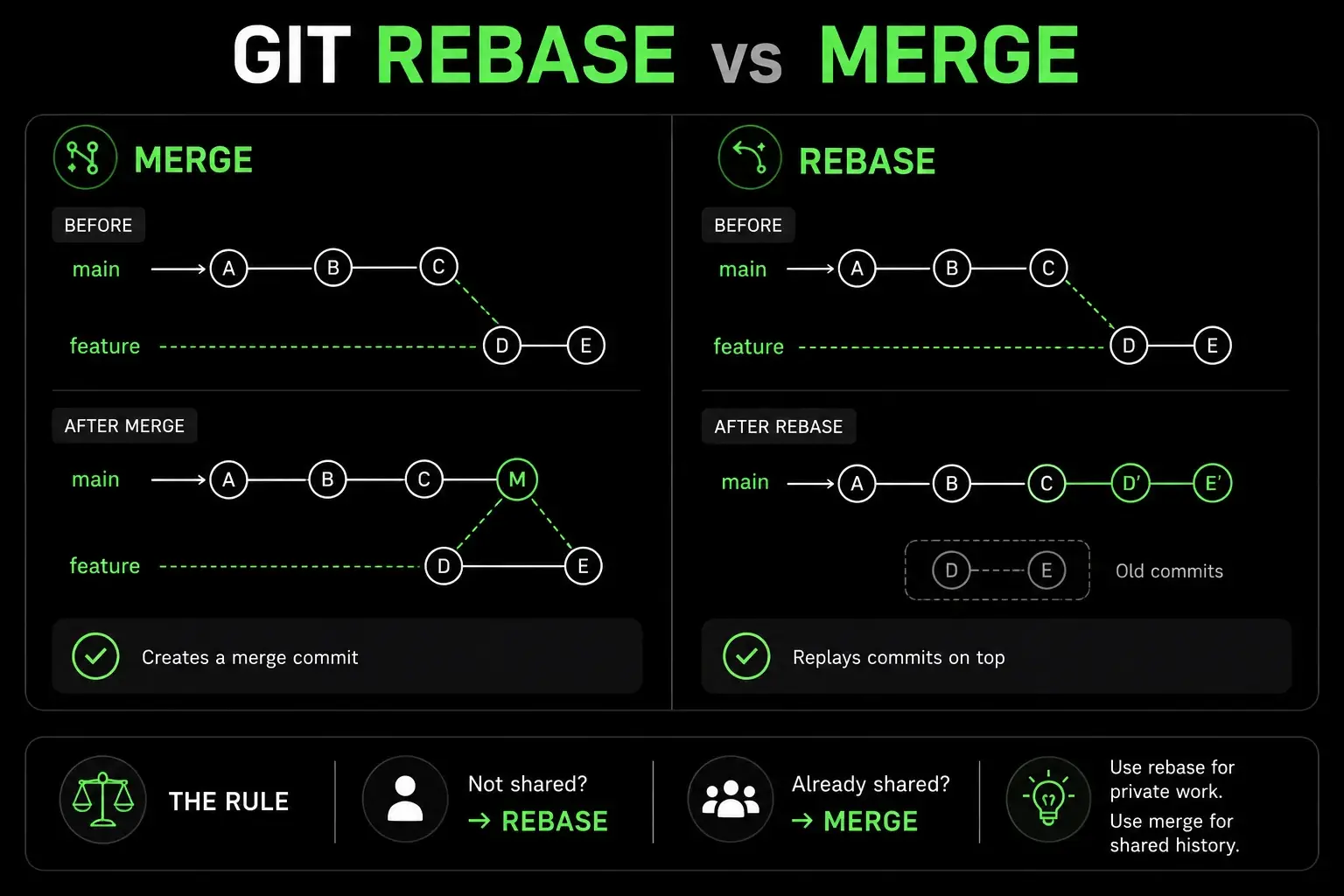
The result looks like you built your feature starting from today's main, even if you actually started three weeks ago. That's the whole appeal, and the whole risk.
Git Rebase vs. Merge: The Rule That Actually Decides It
Every git rebase vs. merge argument that stays stuck on style is missing the actual decision criterion: has anyone else already fetched or pulled these commits?
If the answer is no — the commits exist only on your machine, or only on a branch you alone push to — rebase is safe. You're rewriting history nobody else depends on.
If the answer is yes — the commits are on a shared branch, or teammates have already pulled your feature branch to build on top of it — rebasing creates duplicate commits with different hashes for everyone who already has the old ones. Their next pull turns into a conflict-resolution mess, and their local history no longer matches origin's.
This is documented directly in Git's own reference material as the "golden rule of rebasing": don't rebase commits that exist outside your repository, i.e., commits other people might have based work on (Pro Git, chapter 3.6). It's not a style guideline. It's a description of how rebase actually breaks shared history if you point it at commits other people already have.
When Rebase Makes Sense
Rebase earns its keep on your own, not-yet-shared work:
Cleaning up a feature branch before opening a PR. Squash the "wip," "fix typo," and "actually fix typo" commits into something a reviewer can read.
Keeping a feature branch current with
main.git rebase origin/mainreplays your work on top of the latestmainwithout a merge commit cluttering the log every time you sync.Editing commit messages or splitting a commit before anyone has seen it, via
git rebase -i.
git rebase -i HEAD~3That opens an editor listing your last three commits with pick next to each. Change pick to squash (or s) to fold a commit into the one above it, reword to edit just the message, or drop to remove it entirely.
When Merge Makes Sense
Merge is the right tool once history is shared or the fact that work happened in parallel is itself worth recording:
Bringing a finished feature branch into
main. The commits have likely already been pushed, reviewed, and possibly pulled by others — rebasing them now would rewrite commits people have already built on.Any branch more than one person commits to. Rebasing shifts everyone's history out from under them; merge doesn't.
When you want an honest record of when work landed, not just what changed. A merge commit timestamps integration; a rebased history erases the fact that the work was ever on a separate branch.
git checkout main
git merge --no-ff feature
--no-ff forces a merge commit even when a fast-forward would be possible, which is useful if your team wants every feature's integration point visible in the log.
What Happens If You Rebase a Shared Branch Anyway?
Say a teammate pulled your feature branch yesterday to build their own work on top of it, and today you rebase feature onto a newer main and force-push. Your teammate's next git pull now sees two sets of commits with the same content but different hashes — the ones they already have, and your rewritten ones — and Git can't tell they're "the same" work. They'll get spurious conflicts, duplicate commits in their log, or both.
The fix, if it's already happened, is usually for the teammate to rebase their own branch onto your new one (git rebase --onto) rather than merging the two histories together, but it requires everyone involved to understand what happened. This is the entire reason the shared/not-shared rule exists — the failure mode isn't hypothetical, and it gets worse the more people are touching the branch.
A Practical Workflow That Uses Both
Branch off
mainand commit freely — don't worry about commit hygiene yet.While the branch is still yours alone, run
git rebase -ito squash noisy commits and rewrite messages into something reviewable.Before opening the PR, run
git fetch origin && git rebase origin/mainto replay your cleaned-up branch on the latestmain.Push, open the PR, and stop rebasing once review comments start landing — force-pushes after that point invalidate comment threads on most review tools.
Once approved, integrate with a merge (or your platform's "squash and merge" button, which is functionally a rebase-then-fast-forward performed server-side).
This uses rebase for the part of the branch's life where you're the only audience, and merge (or a review-tool squash) for the moment the commits become shared, permanent history.
FAQ
Does git rebase delete your original commits?
No. Rebase copies each commit onto the new base and gives the copies new hashes; the originals become unreachable and are garbage-collected later, but git reflog can recover them in the meantime.
Is rebase more dangerous than merge? Only on commits other people have already pulled. Rebasing a branch that only exists on your machine is safe, since you're the only one whose history it could break.
Should I use git pull --rebase instead of git pull?
For your own feature branches, yes — it avoids the pointless merge commit you get every time your branch is behind main. Don't use it on a branch teammates are also committing to.
What's a fast-forward merge?
When the target branch has no new commits since you branched off it, git merge just moves the branch pointer forward instead of creating a merge commit — there's nothing to combine.
Can I rebase a branch after opening a pull request? Yes, but it force-pushes and rewrites the PR's commit history, which breaks line-level comment threads on most review tools. Check your team's convention first.
The Takeaway
Stop asking "which one is cleaner" and start asking "who else already has these commits" — that single question resolves almost every rebase-vs-merge decision you'll actually face on a team.
Sources:
Pro Git — 3.6 Git Branching: Rebasing (official Git documentation, Scott Chacon & Ben Straub)